The on-site part of Bhairava

Draw your site. Watch it stay green.

Bhairava Sense finds the controllers and sensors already at your site, lets anyone draw the site as a tree, confirms each sensor works, and then keeps watching. No engineer. No weeks of setup. No changes to your equipment.

Free with BhairavaWorks with what you already have
A facility drawn as a tree: a facility, two floors, and five sensors, four reporting in green and one stopped in redFacilityFloor 1Floor 2Lobby temperatureReportingPlant room pumpReportingServer room humidityReportingStore room doorStoppedWorkshop fanReporting
Your facility as a tree: green while things report, red where something has stopped.

Bhairava Sense is an on-site extension of Bhairava Monitoring. It handles the complexities and functions of each site and feeds refined information to Bhairava.

Where it works

What Sense can listen to

One Sense for every kind of facility and fleet: offices, plants, vessels and vehicles.

Facility: a place that stays put. Fleet: something that moves.

Facility

Offices, malls and hospitals

Watches chillers, air handlers, boilers, lighting and room controls.

Equipment

  • Chillers
  • Air handling units
  • Boilers
  • Water pumps
  • Lighting and room controllers
  • Energy meters

Readings

  • Supply and return temperature (°C)
  • Chilled water flow (L/s)
  • Valve position (%)
  • Fan and pump run status
  • Power (kW) and energy (kWh)
  • Alarms
SpeaksChoose a protocol to see a sample message or filter the list
Facility

Hotels and homes

Watches lighting, blinds, room comfort and power.

Equipment

  • Lighting controllers
  • Blind controllers
  • Room comfort controllers
  • Air handling units
  • Occupancy sensors

Readings

  • Lights on or off, dimming level (%)
  • Blind position (%)
  • Room temperature (°C) and humidity (%)
  • Window contact
  • Room occupied
  • Lighting load (kW)
SpeaksChoose a protocol to see a sample message or filter the list
Facility

Factories and pump stations

Watches pumps, motors, drives, generator panels and energy meters.

Equipment

  • Pump drives
  • Motors
  • Generator panels
  • Energy meters
  • Breakers

Readings

  • Output frequency (Hz)
  • Motor current (A) and temperature (°C)
  • Discharge pressure (bar)
  • Run status and fault trips
  • Fuel level (%)
  • Power (kW) and energy (kWh)
SpeaksChoose a protocol to see a sample message or filter the list
Facility

Heavy industries and manufacturing units with robotics

Watches furnaces, presses, conveyors, robot cells, machine tools and compressors.

Equipment

  • Furnaces and kilns
  • Presses and rolling lines
  • Conveyors
  • Robot cells
  • Machine tools
  • Air compressors

Readings

  • Furnace temperature (°C)
  • Hydraulic and air pressure (bar)
  • Robot and machine status: running, idle, fault
  • Program cycle count and parts made
  • Spindle speed and load
  • Power (kW) and energy (kWh)
SpeaksChoose a protocol to see a sample message or filter the list
Facility

Pharma manufacturing, bottling and assembly plants

Watches clean rooms, filling and bottling lines, packaging machines, assembly stations and utilities.

Equipment

  • Clean room air handling units
  • Filling and capping machines
  • Conveyors and packaging lines
  • Assembly stations and robot cells
  • Chillers and compressed air
  • Energy meters

Readings

  • Room temperature (°C) and humidity (%)
  • Room pressure difference (Pa)
  • Line speed and units per minute
  • Good and rejected counts
  • Machine running, idle and fault status
  • Power (kW) and energy (kWh)
SpeaksChoose a protocol to see a sample message or filter the list
FacilityFleet

Mining sites with transport and excavation fleets

Watches crushers, conveyors, pumps and ventilation on site, and the position and movement of haul trucks and excavators.

Equipment

  • Crushers and screens
  • Conveyors
  • Dewatering pumps
  • Ventilation fans
  • Haul trucks
  • Excavators and loaders

Readings

  • Position: latitude and longitude
  • Speed and heading
  • Engine speed (rpm) and hours
  • Fuel level (%) and fault codes
  • Conveyor and crusher running status
  • Pump pressure (bar) and water level (%)
SpeaksChoose a protocol to see a sample message or filter the list
Facility

Solar farms and plant rooms

Watches inverters, meters and generators.

Equipment

  • Solar inverters
  • Energy meters
  • Generator panels
  • Pump drives

Readings

  • DC voltage (V) and current (A)
  • AC power (kW)
  • Energy today (kWh)
  • Grid frequency (Hz)
  • Grid connected
  • Inverter temperature (°C)
SpeaksChoose a protocol to see a sample message or filter the list
FacilityFleet

Cold storage, farms and shops

Watches temperature, air quality and occupancy sensors.

Equipment

  • Cold room temperature sensors
  • Door contacts
  • Air quality sensors
  • Occupancy sensors
  • Sensor gateways

Readings

  • Cold room temperature (°C)
  • Humidity (%)
  • Carbon dioxide and fine dust
  • Door open or closed
  • Occupied or empty
  • Sensor battery (%)
SpeaksChoose a protocol to see a sample message or filter the list
Facility

Server rooms and telecom sites

Watches UPS units, cooling and rack power.

Equipment

  • UPS units
  • Batteries
  • Cooling units
  • Rack power units

Readings

  • Input and output voltage (V)
  • Output load (%)
  • Battery charge (%) and temperature (°C)
  • On battery
  • Supply and return air temperature (°C)
  • Rack power (kW), water leak
SpeaksChoose a protocol to see a sample message or filter the list
Fleet

Ships and boats

Watches position, speed, engine and tank readings.

Equipment

  • Navigation units
  • Engine and generator panels
  • Pump drives
  • Energy meters

Readings

  • Position: latitude and longitude
  • Speed (knots) and heading (degrees)
  • Satellites in use, altitude (m)
  • Engine coolant temperature (°C)
  • Oil pressure (bar)
  • Fuel tank level (%)
SpeaksChoose a protocol to see a sample message or filter the list
Fleet

Trucks, buses and delivery vans

Watches position, speed and cargo temperature.

Equipment

  • Navigation units
  • Engines
  • Cargo temperature sensors
  • Door contacts
  • Sensor gateways

Readings

  • Position: latitude and longitude
  • Speed and heading
  • Cargo temperature (°C)
  • Door open or closed
  • Engine speed (rpm), fuel level (%) and fault codes
SpeaksChoose a protocol to see a sample message or filter the list
Compare

One Sense instead of two systems

BMS: Building Management System · FMS: Facility Management System

A BMS, an FMS and Bhairava Sense compared
What is comparedBMSFMSBhairava Sense
CoversBMSOne facility’s equipmentFMSThe facility’s work and assetsBhairava SenseBoth, in one place
Where it fitsBMSOne large facilityFMSFacilities a team looks afterBhairava SenseAny facility or fleet: large, small or spread out
Setting it upBMSSpecialist engineers, over weeksFMSStaff enter assets and dataBhairava SenseSearch, find and attach the equipment on site
Who reads itBMSTrained engineersFMSFacility managersBhairava SenseAnyone: plain screens, 20 languages
Equipment it hearsBMSMostly its own vendor’sFMSWhat’s typed in or connectedBhairava SenseMany makers and kinds, from offices to vessels
Things that moveBMSNoFMSRarelyBhairava SenseYes: ships, trucks, vans

One Sense instead of two systems: your facility’s equipment and its work, together.

Beyond one facility

Where an FMS, BMS stops, and Bhairava Sense carries on

A facility or building management system (FMS, BMS) is the right tool for one large facility. Many of the places people need to watch are neither large nor part of one facility. That is where Bhairava Sense begins.

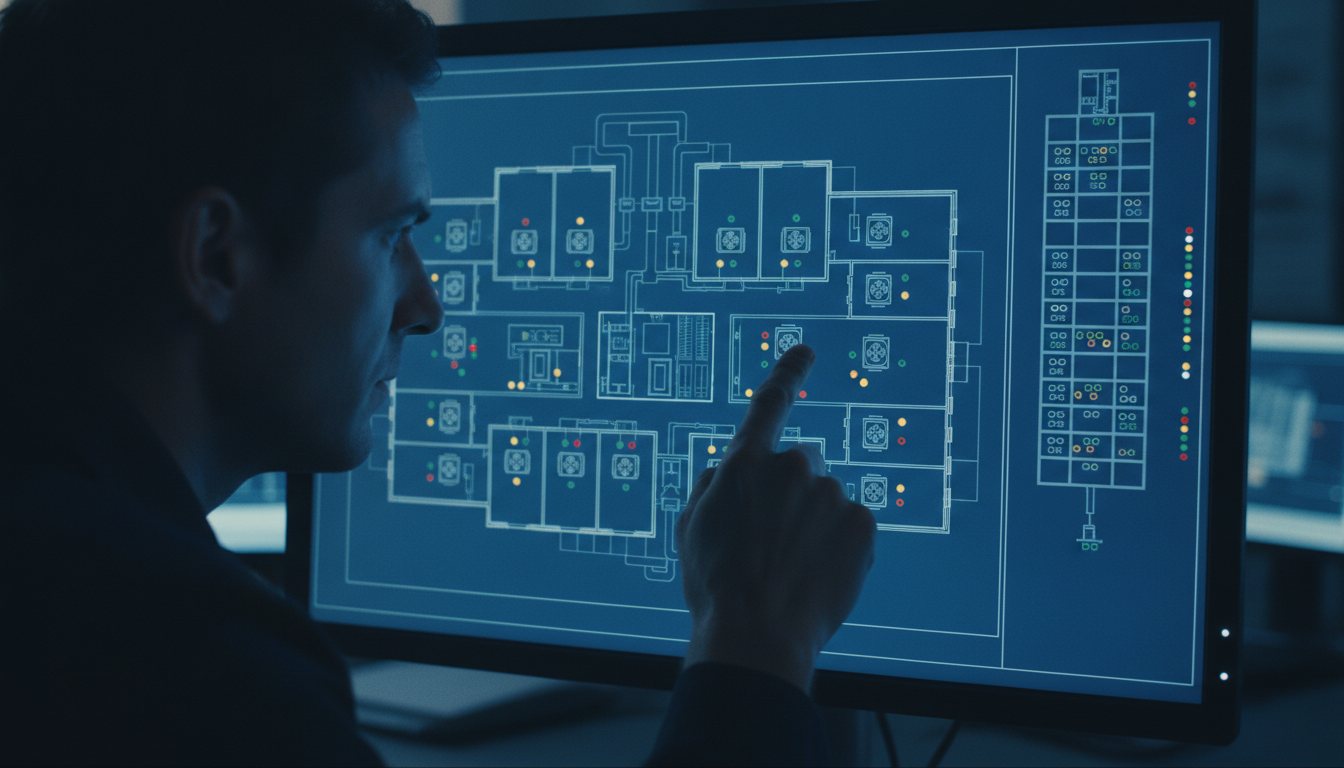
A specialist studying a wall of dense engineering screens in a facility control room
An FMS, BMS control room: dense engineering screens, read by a trained specialist.

What an FMS, BMS is built for

An FMS, BMS comes from a third party and is set up by specialist engineers over weeks, sensor by sensor. Its screens are engineering drawings that need a trained eye.

For one large facility, that cost makes sense. The facility is in one place, and there are engineers to look after it.

Today: nobody is watching
A lane of small houses, each with a small CNC lathe workshop inside, and nobody watching them
Today: small CNC lathes, one or two to a house, and nobody is watching.

What it leaves out: the small and the scattered

A small facility cannot justify an FMS, BMS. Nor can the workshops and small units spread across many places: machines in cottage industries working in separate houses, shops, cold rooms, vehicles.

Each is too small for an FMS, BMS, and together they are in too many places for one. Today many of them are simply not watched.

With Bhairava Sense: every workshop on one screen
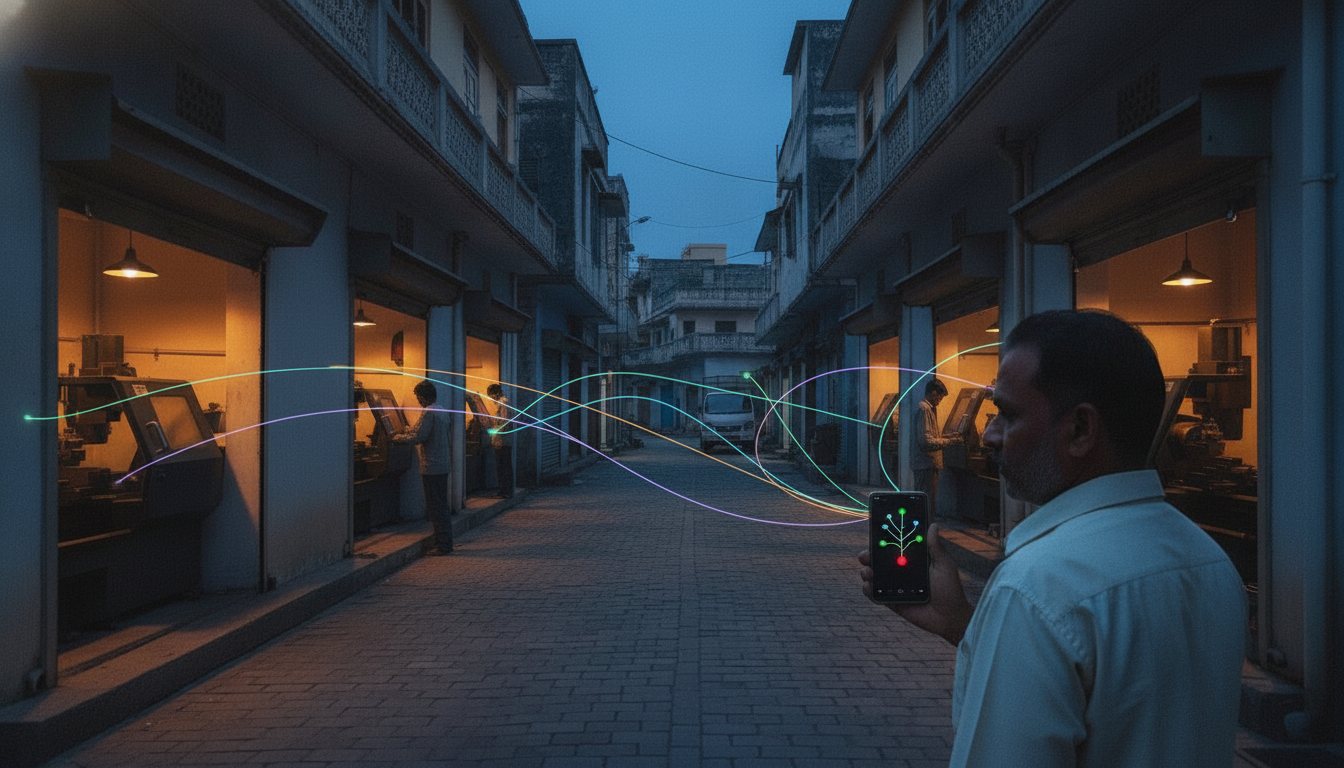
The same lane of houses with CNC lathes, now with the owner standing in the foreground checking a phone that shows a simple tree of green dots and one red, with thin threads of coloured light reaching it from the workshops
The same lane, now watched: the owner checks every workshop from his phone.

What Bhairava Sense does instead

A laptop at each place, and soon a phone, run by an ordinary person. It finds what is there by itself, and the person draws the place as a tree in an afternoon.

Every place, however many and however far apart, reports to one Bhairava Dashboard.

On the left, one large facility with a single facility or building management system around it, and five small places outside it left dark and unwatched: a home machine, a workshop, a shop, a truck and a cold room. On the right, the same five places each reporting in its own colour into one Bhairava DashboardOne system, one facilityMany small places, one watchFMS, BMSTruckHome machineWorkshopShopCold roomBhairava DashboardTruckHome machineWorkshopShopCold roomTop: one large facility with a single facility or building management system around it, and five small places outside it left dark and unwatched. Bottom: the same five places each reporting in its own colour up into one Bhairava DashboardOne system, one facilityFMS, BMSTruckHome machineWorkshopShopCold roomMany small places, one watchBhairava DashboardTruckCold roomWorkshopHome machineShop
Left: a facility or building management system looks after one large facility, and the small places around it stay dark. Right: the same places, each watched, all reporting to one dashboard.
An illustration

Take an example: CNC lathes in a cottage industry

This is an example, not a customer story. Say a business has small CNC lathes run as a cottage industry: a dozen machines, one or two to a house, in nine houses across one town.

  1. Today

    Nobody knows which lathe is running and which has stopped until someone visits or phones.

  2. An FMS, BMS is out of the question

    A facility or building management system for a single lathe in a house cannot be justified.

  3. At each house

    The person there opens Bhairava Sense on the laptop they already have and presses Discover. The lathe’s controller appears.

  4. Name it, place it

    They name it, place it on the tree (Workshop, then Machine) and add a photo.

  5. One dashboard

    The owner opens one Bhairava Dashboard and sees every workshop: green where the machines report, red where one has stopped, with the place and the photo of exactly which lathe.

What changed: the owner no longer drives round or phones to find out. A stopped lathe shows up red, with the house and the photo that say where to go.

What changes for you

Free with Bhairava

An FMS, BMS means software licences, specialist engineering to set it up, and often its own hardware. Bhairava Sense comes with Bhairava at no extra charge, and runs on the laptop you already have, and soon your phone, set up by your own person.

No vendor lock-in

An FMS, BMS usually ties the facility to one maker’s system, and to that maker’s engineers for every change. Bhairava Sense works with equipment from different makers side by side, and the tree, names and photos you build are yours.

No call-out for every change

With an FMS, BMS, a moved room, a replaced controller or a new sensor is often a call-out to a specialist. With Bhairava Sense your own person makes the change on the tree, and the “Go to” directions with photos tell anyone where to look.

Works with what you already have

It runs on the devices you already own: a Windows laptop today, and soon your phone. It works with the controllers and sensors already installed, from different makers side by side, with nothing to replace or rewire.

A facility or building management system compared with Bhairava Sense
What is comparedA facility or building management systemBhairava Sense
Built forA facility or building management systemOne large facility.Bhairava SenseSmall facilities, and many small places spread far apart.
Who sets it upA facility or building management systemSpecialist engineers, usually from a third party.Bhairava SenseAn ordinary person who knows the place.
How long it takesA facility or building management systemWeeks, sensor by sensor.Bhairava SenseIt finds what is there by itself, and drawing the place takes an afternoon.
What the screen looks likeA facility or building management systemEngineering drawings that need a trained eye.Bhairava SenseA simple tree: green where things report, red where something has stopped.
Many scattered placesA facility or building management systemNot what it is made for.Bhairava SenseEvery place reports to one Bhairava Dashboard, however many and however far apart.
CostA facility or building management systemSoftware licences, specialist engineering to set it up, and often its own hardware.Bhairava SenseFree with Bhairava. A laptop you already have; phone app coming.
Cost makes sense forA facility or building management systemA large facility.Bhairava SenseA single small place, and just as well for many of them.
Vendor lock-inA facility or building management systemUsually one maker’s system, and that maker’s engineers for every change.Bhairava SenseEquipment from different makers side by side. The tree, names and photos are yours.
When something changesA facility or building management systemA call-out to a specialist for a moved room, a replaced controller or a new sensor.Bhairava SenseYour own person changes the tree. “Go to” directions with photos tell anyone where to look.
Devices and equipmentA facility or building management systemIts own workstation, and usually its own maker’s controllers.Bhairava SenseThe laptop you have (phone app coming), and the equipment you already have.
Effect on your equipmentA facility or building management systemBuilt to supervise, and often to control, the equipment.Bhairava SenseNone. It only asks and reads, and changes nothing.

Already have an FMS, BMS? Keep it.

Where a large facility already has an FMS, BMS, Bhairava Sense can sit alongside it. It only asks and reads, and changes nothing. Big facility or small, one place or many, it all arrives on one dashboard.

When what you watch is small and scattered →
Three stages

Find it, give it meaning, send it on

Bhairava Sense works in three stages, and you can follow each one in the knowledge base. Everything it senses ends up on the Bhairava Dashboard.

Four steps from left to right: scattered controllers and sensors are found, gathered into one ordered tree, signalled onward, and arrive at the Bhairava DashboardSiteFloor 1Floor 2Stage 1Sensor DiscoveryStage 2Sensor FusionStage 3Sensor BroadcastDestinationBhairava DashboardFour steps from top to bottom: scattered controllers and sensors are found, gathered into one ordered tree, signalled onward, and arrive at the Bhairava DashboardSiteFloor 1Floor 2Stage 1Sensor DiscoveryStage 2Sensor FusionStage 3Sensor BroadcastDestinationBhairava Dashboard
How it works

From unknown equipment to a live board

  1. Find

    Bhairava Sense discovers the controllers and sensors already on the site, by itself.

  2. Draw

    You draw the site as a tree: add branches such as floors and rooms, and name them.

  3. Confirm

    Drag what was found onto the branches, and confirm that each sensor is working.

  4. Watch

    The same tree becomes the live board, and Bhairava Sense keeps watching.

The tree is the live board

There is no second screen to learn. The tree you drew is the board you watch. A green line is a sensor that is reporting. A red line is a sensor that has stopped.

The place, the name and the photos you added tell you exactly where to go.

  • Green: it is reporting
  • Red: it has stopped

What the colours mean →

Three sensors listed with a place and a name: two green and reporting, one red and stoppedLobby temperatureFloor 1ReportingServer room humidityFloor 2ReportingStore room doorFloor 2Stopped
See it

A look at the screens

Plain screens that an ordinary person can read at a glance.

Your place drawn as a simple tree: floors, rooms, controllers and sensors, green where they report.
Press Discover in a room and the equipment there appears, ready to add to the tree.
Every reading from the same sensor gathered in one place, opened with a click.
See exactly what was sent to your dashboard, and when.

Twenty languages — each person picks their own

The same screen in English, German and Arabic (read right to left).

English
Deutsch
العربية
Easy on your site

Nothing to install into your equipment

  • No engineer, no weeks of setupSomeone who knows the site can do it.
  • No changes to the equipmentBhairava Sense only asks and reads.
  • Photos and names where you need themWhen something stops, the place, name and photos show you where to go.

Does Bhairava Sense change anything on my equipment? →

Where it fits

Offices, workshops and fleets

Offices

Know about a stopped sensor on any floor, and exactly which room to walk to.

Workshops

Keep an eye on the controllers and sensors across a workshop floor, without touching them.

Fleets

Describe each vehicle as part of your tree and see at a glance what has gone quiet.

One site, or many

Bhairava Sense feeds the central Bhairava dashboard, so every site you look after can be seen together in one place.

Visit Bhairava
For vehicles

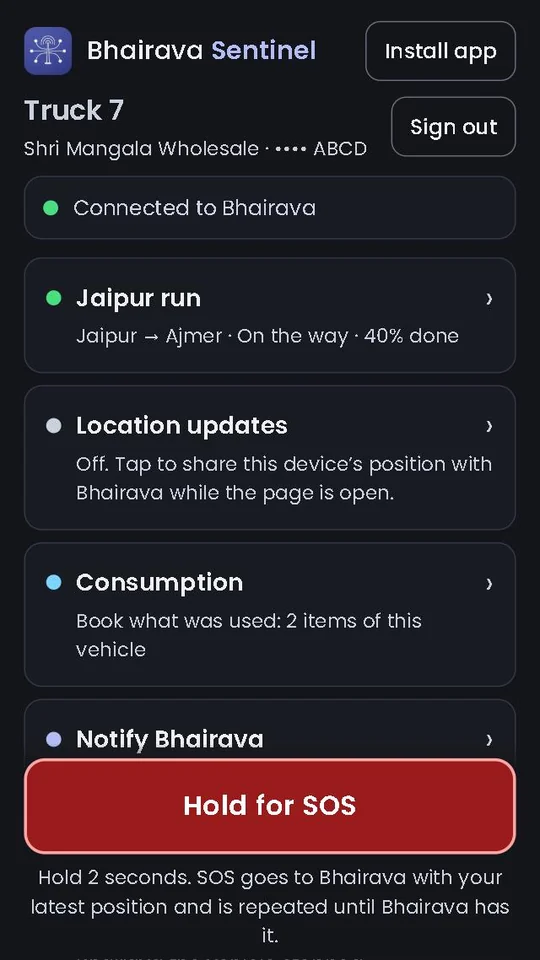
On the road, use Bhairava Sentinel

For trucks, buses, ambulances and ships, Bhairava Sentinel runs on the driver's phone, on its own. No laptop, and no Sense needed.

Sign in with the vehicle's key. Position, fuel and stock use, SOS and breakdowns go straight to Bhairava, and the current trip is right there on the phone.

Bhairava Sense stays the laptop app for places: facilities, workshops and sites.

Android app, version 0.8.2. The web app works on any phone.

Bhairava Sentinel on a phone: the vehicle, Connected to Bhairava, the current trip, location, consumption, breakdown and a red Hold for SOS button